· Digital Footprint Check · Content Marketing · 14 min read
A Facebook Scammer List: How to Build Your Own & Fight Back
Looking for a Facebook scammer list? Learn to identify, document, and report fake profiles with our expert OSINT guide. Protect yourself from fraud today.
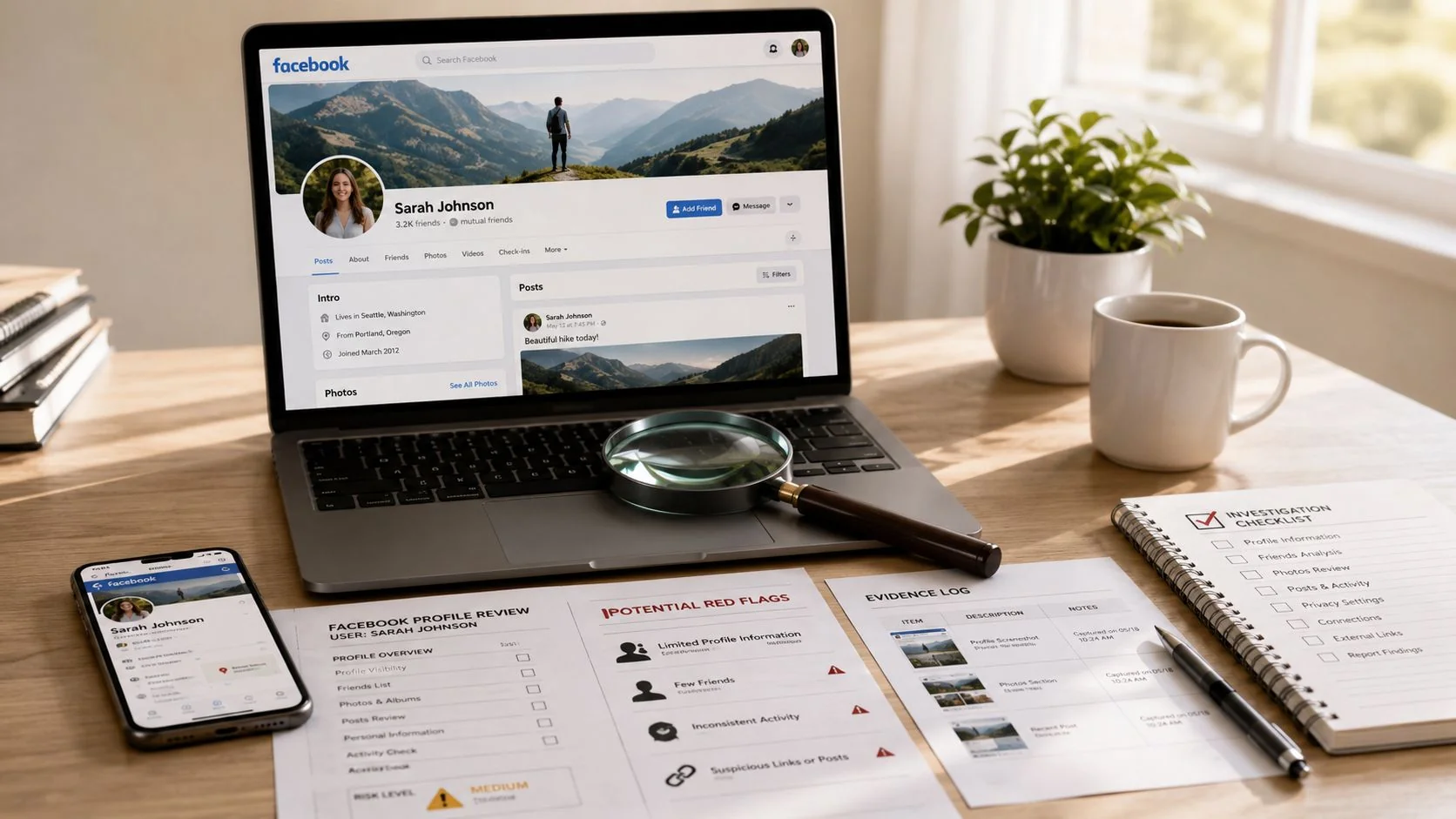
Most advice about a Facebook scammer list starts from the wrong premise. People search for a master list of bad accounts, paste a profile name into Facebook search, and hope someone else has already done the work. That approach feels efficient, but it breaks down fast because scam accounts change names, swap profile photos, clone real people, and move conversations off-platform before a static list can help.
A better model is to build a case file, not chase a list. That shift matters for personal safety, dating app verification, gaming account security, identity theft prevention, and even reputation management. The same habits that help you assess a suspicious seller or romantic contact also help you audit your own exposure online. If your phone number, old usernames, or abandoned social profiles are easy to find, scammers can use them to sound credible to your friends, coworkers, or family.
Why a Public Facebook Scammer List Fails You
The search for a Facebook scammer list makes sense. People want certainty. They want a quick yes-or-no answer before replying to a friend request, buying a Marketplace item, or continuing a Messenger conversation. The problem is that no authoritative, publicly maintained Facebook scammer list exists as a static dataset; instead, Meta relies on real-time, machine-learning-based detection with reported accuracy rates exceeding 85% in academic prototypes, because scammers can create new profiles in minutes, making static lists instantly obsolete (academic discussion of scam-profile detection).

That single fact changes the whole strategy. If the platform itself doesn’t rely on a permanent blacklist, you shouldn’t either. A list can still have limited value inside a local community group or a workplace incident log, but it won’t function as a universal defense.
Static lists age badly
A scammer only needs to do one of a few simple things to escape a public list:
- Rename the account after reports pile up
- Clone a real profile and contact the same friend circle again
- Use a compromised legitimate account that won’t look suspicious at first glance
- Switch channels from Facebook to another app before victims verify anything
This is why the familiar advice to “just check whether the profile is on a scammer list” doesn’t hold up under real-world pressure.
Practical rule: Don’t ask, “Is this person on a list?” Ask, “Can I document enough open-source evidence to trust or reject this profile?”
Skill protects you longer than a list
The stronger defense is repeatable judgment. Once you know how to evaluate profile age, image provenance, communication style, and off-platform behavior, you can assess not only Facebook profiles but also dating app matches, fake recruiter accounts, gaming community impostors, and reputation attacks built from stolen identity fragments.
That matters beyond fraud losses. A fake account can damage job prospects if it impersonates you publicly. It can threaten personal safety if it learns where you live or work from overshared posts. It can also target gaming profiles and online communities where trust forms quickly around shared interests.
If your own public information is too exposed, that gives scammers more material to work with. A solid primer on reducing that exposure is this guide to the hidden dangers of oversharing on social media.
Spotting the Signs Beyond Obvious Red Flags
A suspicious Facebook profile rarely gives itself away with one dramatic clue. Most novices overvalue a single trait, like bad grammar or a low friend count. Experienced investigators look for a pattern of mismatch between identity, behavior, and context.
Research from F-Secure found that approximately 62% of all social media phishing actors use Facebook as their primary platform, often employing tactics like creating new accounts with few friends, no recent posts, and using fake Marketplace listings or urgent messaging to lure victims (F-Secure on Facebook-based phishing lures). That tells you where to focus. Not on one red flag, but on combinations.
Profile clues that deserve a second look
Facebook’s own help materials identify common warning signs such as no profile picture, fewer than 50 friends, newly created profiles, poor spelling or grammar, requests to move conversations off Facebook, and direct requests for passwords, Social Security numbers, or financial information (Facebook Help Center guidance on scammer profile signs).
Those indicators are useful, but they become much stronger when you read them in context:
- Sparse profile plus high urgency often means the account is disposable.
- Normal-looking profile plus strange request can indicate impersonation or account takeover.
- Attractive deal plus pressure to pay now is more meaningful than the cheap price alone.
- Friendly conversation plus sudden secrecy usually signals a transition from trust-building to extraction.
Behavioral clues usually beat cosmetic ones
A scammer can fake family photos, job history, and casual posts. Behavior is harder to fake consistently.
Look for these shifts:
- Conversation steering: They ignore your questions and keep pushing toward payment, codes, or private contact details.
- Urgency language: “Act now,” “last chance,” or “don’t tell anyone” tries to shut down verification.
- Identity borrowing: They claim a role that discourages skepticism, such as support staff, a military member, a landlord, or a mutual acquaintance.
- Channel migration: They want WhatsApp, Telegram, text, or email early, before you’ve validated them.
If you’re seeing those patterns, treat the profile as untrusted until verified.
| Red Flag | Reliability Score | What It Really Means |
|---|---|---|
| Newly created profile | Medium | Useful signal, but not enough on its own |
| Very low friend count | Low to Medium | Can indicate a burner account, but can also describe real users |
| Poor spelling and grammar | Low | Common in scams, but many real users also write casually or imperfectly |
| Refusal to answer specific questions | High | Strong indicator of scripted interaction |
| Pressure to move off Facebook | Very High | Often signals an attempt to avoid platform safeguards |
| Price or offer that feels unreal | Medium | Worth scrutiny, but not proof by itself |
| Requests for codes, deposits, or sensitive info | Very High | Treat as hostile behavior |
What works better than “trust your gut”
Gut instinct is useful, but it isn’t enough when the account looks polished. Use a checklist instead. A practical one is in this guide on fake profiles on Facebook.
The strongest red flag isn’t usually what the profile looks like. It’s what the account wants you to do next.
That distinction matters in romance scams, catfishing detection, rental fraud, and account recovery scams. The visual layer is bait. The behavioral layer is where the scam lives.
Your OSINT Workflow for Verifying a Profile
The safest way to investigate a suspicious account is to move from simple checks to deeper ones, without alerting the other person and without crossing legal or ethical lines. Use only public information, information the person sent you directly, and records you already have access to.
A reliable OSINT workflow doesn’t try to “hack” anything. It builds confidence, one observable fact at a time.
Stage one: Freeze the basics before they change
Start by preserving the profile as it appears now.
Record:
Profile URL
Names change. URLs are better identifiers than display names.Current profile name and username
Note exact spelling, punctuation, and emoji use.Profile and cover images
Save screenshots and image files where possible.About details
Workplace, school, city, relationship status, joined date, and linked accounts.Recent visible activity
Posts, comments, Marketplace listings, public group activity, and reply patterns.
This first pass gives you a baseline. Scammers often edit profiles once they sense scrutiny.
Stage two: Test identity consistency
Now look for contradictions.
Check whether the account’s visible story matches its footprint:
- Timeline consistency: Do life events, photos, and comments reflect a real passage of time?
- Social consistency: Do friends comment like genuine acquaintances, or do interactions look generic and shallow?
- Location consistency: Does the claimed city make sense against posting times, language use, and listed items?
- Role consistency: If the person claims to be a recruiter, landlord, gamer, or business owner, do public traces support that role?
A real person may still have a thin footprint. That’s why you’re not looking for perfection. You’re looking for coherence.
Stage three: Reverse-image and username checks
Run the profile picture, cover photo, and any listing photos through reverse-image search tools. This is one of the fastest ways to expose stolen images, catfishing, and recycled Marketplace fraud. If the same face appears under different names, or the “for sale” item appears on unrelated sites, you have a stronger basis for concern.
Then search the person’s username, display name variants, phone number if shared, and email handle if disclosed. You’re checking whether the identity appears consistently across the wider web or only exists inside one suspicious Facebook account.
If you want to understand how investigators and developers structure large-scale collection and analysis, Apify Hub has a practical explainer on turning web data into products. It’s useful background for understanding why repeatable data collection beats guesswork.
Stage four: Watch for off-channel migration
One of the clearest technical indicators is the move away from Facebook’s own environment. A documented OSINT benchmark found that off-channel migration from Messenger to WhatsApp or text occurs in 89% of confirmed scam sequences and is a powerful predictor of fraudulent intent (discussion of off-channel migration in scam sequences).
That doesn’t mean every request to text is malicious. It means the request changes the risk profile. Once someone pushes you off-platform, they reduce the platform’s visibility and make evidence collection harder.
If the profile wants to leave Facebook before it answers basic verification questions, stop treating that as a casual preference. Treat it as an investigative event.
Stage five: Decide what evidence would change your mind
This step is where novices improve fastest. Before you continue the conversation, define what would count as verification.
Examples:
- For a Marketplace seller, that might be a real-time photo of the item with a specific handwritten note and willingness to meet in a safe public place.
- For a dating profile, that might be consistent public identity signals and a willingness to verify without pressure or secrecy.
- For a recruiter or business contact, that might be a traceable company identity and contact route you can independently confirm.
If the account dodges every reasonable verification step, that’s useful evidence in itself.
For readers learning the wider discipline, this introduction to OSINT tools for beginners is a good next step.
Building Your Case How to Document Evidence Safely
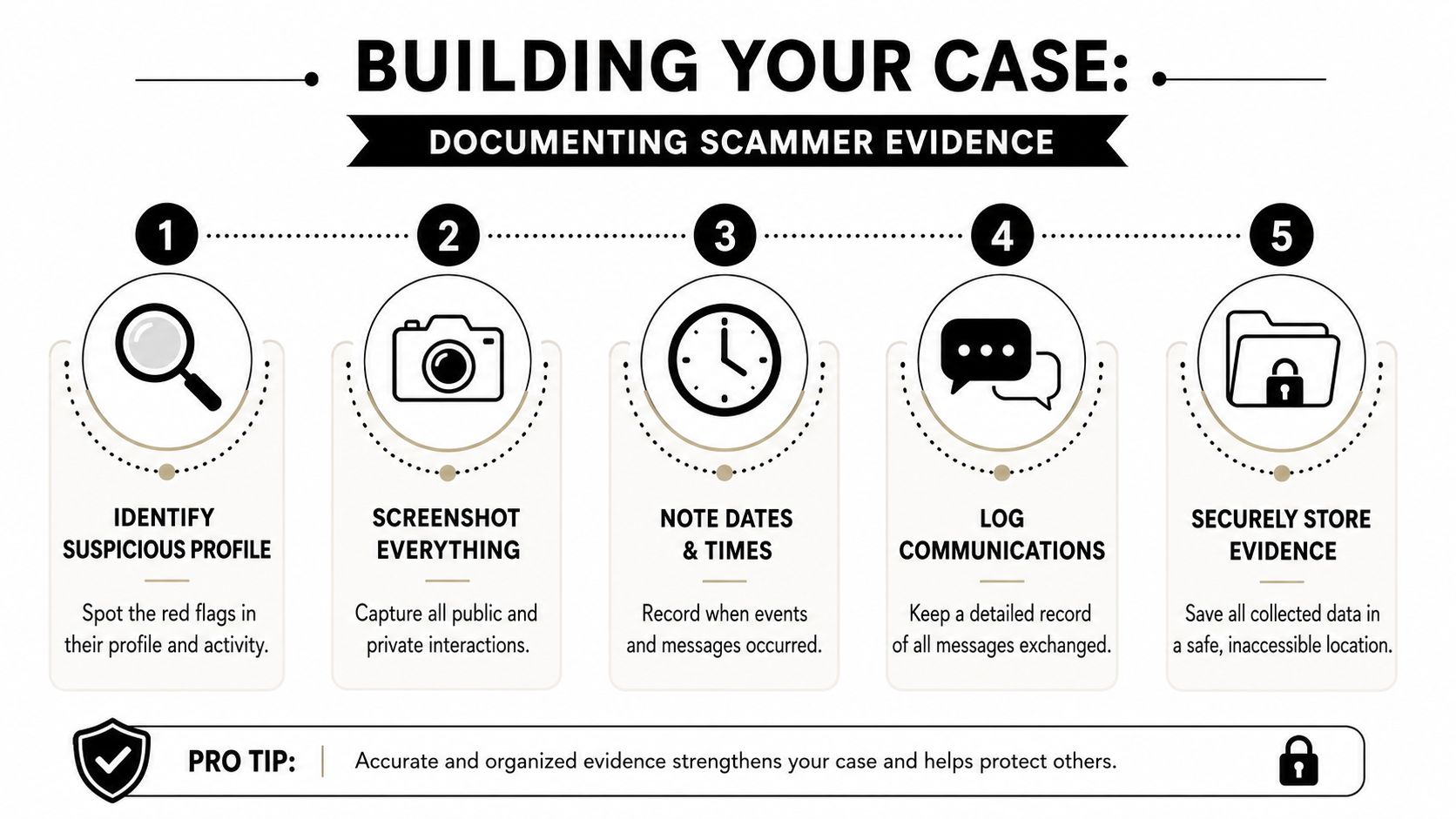
Once you think a profile is fraudulent, stop trying to “win” the interaction. Start documenting it. The difference matters. Arguing with scammers rarely helps. Preserving evidence does.
In Marketplace investigations, visual evidence is especially important. Analysis cited by AllAboutCookies found that 92% of fake listings use stock photos or images stolen from elsewhere on the internet, while 78% of fraudulent sellers refuse in-person meetings and demand untraceable payments (analysis of Facebook Marketplace scam patterns). Those are exactly the kinds of claims you should document with screenshots and notes.
What your case file should contain
A useful case file is simple, orderly, and easy for a platform reviewer or investigator to follow.
Include:
Profile identifiers
Profile URL, display name, username, visible profile details, and screenshots of the account page.Conversation evidence
Full screenshots of Messenger exchanges, including requests for money, codes, personal data, or movement to another app.Listing evidence
The item page, price, description, seller profile, and any inconsistencies between photos and claims.Image findings
Reverse-image search results showing the same photo elsewhere, when applicable.Payment requests
Any mention of wire transfers, gift cards, deposits, crypto, Venmo, or other payment methods.Timeline notes
A short chronology with dates, times, and what happened at each stage.
Preserve context, not just highlights
Many people take one screenshot of the “worst” message and think they’re done. That’s not enough. You need enough surrounding context to show sequence, intent, and escalation.
Capture:
- The lead-up before the suspicious request
- The exact wording of threats, pressure, or promises
- Visible timestamps
- The platform context, such as whether it came from Marketplace, Messenger, a group, or a friend request
If money is involved, save transaction records, confirmation emails, and any account details the scammer provided. Don’t alter the files. Keep originals.
Handle evidence like you might need it later
Security teams use chain-of-custody thinking because evidence loses value when it’s scattered, renamed badly, or partially overwritten. You don’t need a forensic lab, but you should use the same mindset. This overview of ITAD chain of custody documentation is a useful model for organized record handling.
Field note: A messy folder can make solid evidence unusable. A clean folder with filenames, dates, and short notes can make a weak case understandable.
Store your case file somewhere secure. Avoid forwarding sensitive screenshots all over your contacts. If the scam involved your dating profile, gaming profile, or professional identity, limit sharing to the platform, relevant financial institutions, and authorities who need it.
For image-based verification work, this resource on reverse image search for people is worth bookmarking.
Taking Action Reporting Scammers to Get Results
A lot of people assume reporting is pointless because the account might disappear and come back under another name. That misses the bigger picture. Reporting isn’t just about one takedown. It’s about feeding the signals that help platforms, payment providers, and authorities connect patterns.
The stakes are large. Americans lost $2.1 billion to social media scams in 2025, with Facebook accounting for the largest share of reported losses, according to reporting that summarizes FTC findings (overview of FTC-linked reporting on social media scam losses). If you were targeted, your report helps define a pattern larger than your single case.
Use the right report path
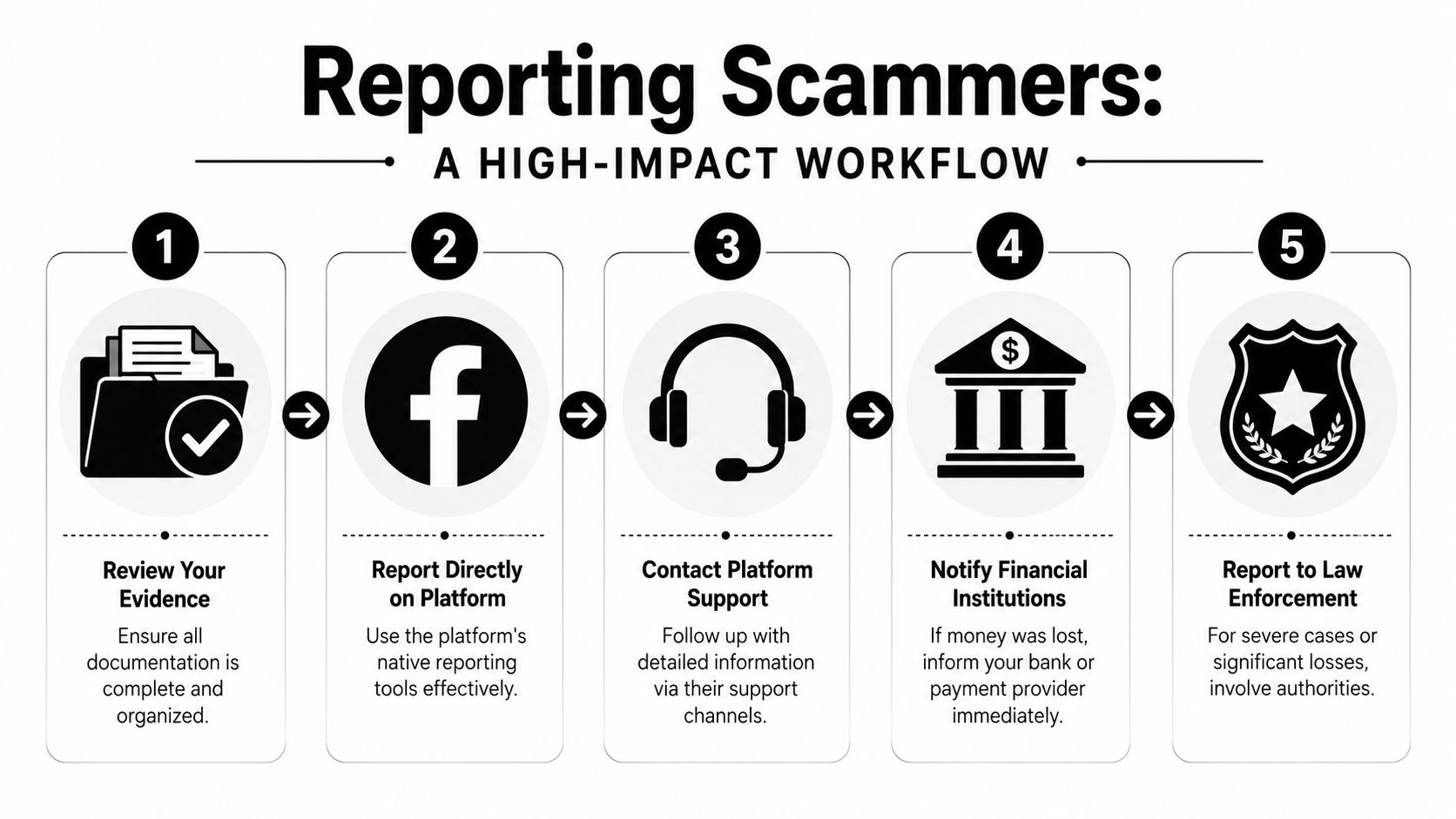
Facebook gives different reporting routes for different content. Use the most specific one available.
- Profile report when the account is fake, impersonating someone, or operating as a scam identity
- Message report when the conversation contains payment requests, code requests, threats, or fraud attempts
- Marketplace listing report when the item itself is deceptive, stolen, unavailable, or supported by fake images
- Post or ad report when the scam is embedded in a public post, page, or promotion
Specificity helps reviewers understand what rule was violated.
Write reports for humans and filters
Short reports work better than emotional ones. State what happened, why it’s fraudulent, and what evidence you preserved.
A practical report might say:
This account appears to be a fake profile used for fraud. It requested payment outside normal buyer protections, pushed the conversation off Facebook, and used images that appear to be stolen. I preserved screenshots of the profile, listing, timestamps, and message history.
Use words like impersonation, fraud, scam, fake account, stolen images, and payment request when they’re accurate. Avoid speculation you can’t support.
Escalate when money or identity data is involved
If you sent money, gave up login codes, or shared sensitive personal information, report beyond Facebook.
Take these actions quickly:
- Contact your bank or payment provider and explain the transaction.
- Change exposed passwords and enable stronger account security.
- Report the incident to the FTC if you’re in the United States.
- Notify local or national cybercrime authorities if your jurisdiction has a reporting portal.
- Warn affected contacts if the scammer cloned your identity or used your compromised account.
If the scam started in Messenger, this guide on scams on Facebook Messenger can help you recognize the patterns you should include in your report.
Reporting works best when it’s timely, documented, and specific. A vague “this seems sketchy” report is easy to dismiss. A report with profile URL, timestamps, image evidence, and clear fraud markers is harder to ignore.
From Potential Victim to Proactive Guardian
The most useful answer to the Facebook scammer list problem isn’t a bigger list. It’s a better method. When you build a case file instead of chasing rumors, you stop reacting like a target and start thinking like an investigator.
That mindset carries into other parts of digital life. It helps with online dating safety when a match avoids verification. It helps with identity theft when someone clones your photos or reuses your old usernames. It helps with gaming account security when a scammer poses as support staff or a trading partner. It helps with reputation management when a fake profile could affect how employers, clients, or colleagues see you.
You don’t need advanced tooling to start. You need discipline. Capture the profile URL. Preserve screenshots. Test the images. Check for identity consistency. Treat requests to leave the platform as meaningful. Document everything cleanly. Report with precision.
Protecting yourself is only part of the job. These same habits protect your family, your coworkers, your friends list, and anyone else who might trust a cloned profile because it looks familiar.
Your first step is to see what information about you is already exposed online. Digital Footprint Check offers a free checker at www.digitalfootprintcheck.com/free-checker so you can review your public footprint, spot identity risks early, and reduce the data scammers use against you.


![User Search: Find Anyone Online with These OSINT Techniques [2025 Guide]](/images/blog/user-search.webp)